Manage Rejects and Sync Databases
These optional tools move rejected files out of a stacking tree and copy grades, plans, and captures between two database files.
A direct desktop connection does not require database sync.
Manage rejected files
Preview changes with the --dry-run flag, then restore files from the recorded paths if needed.
Stacking tools such as PixInsight load all files under your lights
directory, including rejected frames. The move-rejects command
moves rejected frames and their sidecars (such as .xisf,
.json, and .txt files) into a REJECT/ subdirectory.
This removes them from the processing path. The tool records the original paths so you can restore the files later:
# Move rejects to <image_dir>/<Project>/REJECT/... with their sidecars.
# Idempotent; every move is recorded for restore.
psf-guard move-rejects --db my-db [--dry-run]

# If you want to undo a rejection, un-reject the frames in the UI and run the following command:
psf-guard restore-rejects --db my-db          # restores only un-rejected files
psf-guard restore-rejects --db my-db --all # restores everything- The process is recorded — every operation is saved in an archive table in the database, with a redundant manifest file in each archive root for recovery, ensuring that restores are exact.
- The process is reversible — the
restore-rejectscommand by default restores only files that are no longer marked as rejected in the UI. You can use the--allflag to restore all files. The command does not overwrite existing files; if an original path is occupied, the tool restores the file with a.restoredsuffix. - Files remain visible — archived frames are still
indexed and searchable in the grader UI, as the file index covers the
REJECT/subtree. - The command is configurable — you can configure the
behavior using the
--reject-segment,--reject-depth, and--sidecar-extsflags, or by defining areject_archiveblock in the registry configuration file.
filter-rejected command, which does not move
files out of the directory tree.
Sync databases between machines
You can grade images on one machine while a telescope captures images on
another. The sync command transfers state between two scheduler
databases, using registry slugs or .sqlite file paths, and matches
images by their stable GUID:
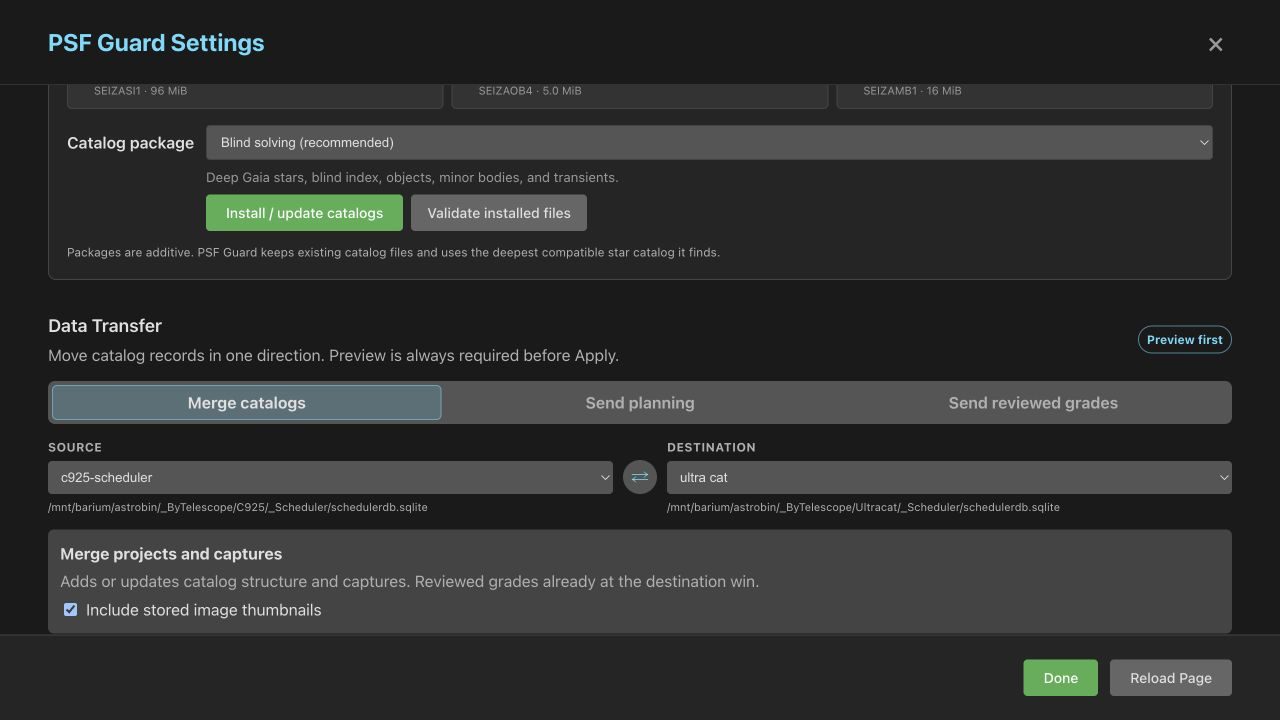
Review staged previews
The Settings → Sync → Staged previews section lists all transfers waiting on the server, including background transfers created by the N.I.N.A. plugin. Each entry shows the destination catalog, operation type, source database, insertion and update counts, grade counts, and expiration time.
You can expand the What would change section to view individual field changes. This list shows grade transitions, reasons for changes, and any projects, targets, plans, or images that will be inserted or updated, up to a limit of 400 lines.
- Apply writes the changes from the reviewed preview to the destination database.
- Refresh compares the saved source data with the current destination database state again.
- Discard deletes the staged preview without modifying the destination database.
The system does not modify the destination database until you click Apply. For large data transfers, the server generates the preview in the background. The client polls the server for progress updates while the server loads and compares the data, which prevents HTTP timeouts through reverse proxies.
# Mirror projects, targets and captured images FROM the telescope INTO your DB.
# Your local grading is preserved; new images arrive with the telescope's grade.
psf-guard sync pull --from telescope.sqlite --to my-db --dry-run

# Push edited projects, targets, templates, plans, and rule weights.
# Telescope captures, counts, images, and grades stay unchanged.
psf-guard sync planning --from my-db --to telescope.sqlite --dry-run

# Push your grading decisions back TO the telescope (one-way, source wins).
psf-guard sync grades --from my-db --to telescope.sqlite --dry-run
You can run these commands in a loop: use pull to refresh the local database, plan and grade locally, and then push the planning and grades updates back to the telescope:
sync pullcopies the structure (projects, targets, exposure plans, and templates) and captured images into your local database. The telescope database is treated as the authority for structural data, but your local grading decisions are preserved. An existing image retains its local grade unless its status is Pending, in which case it adopts the grade from the telescope.sync gradespushes grading statuses and rejection reasons from the local database to the destination. You can filter which records are transferred by using the--status,--project, or--targetflags.sync planningcopies project and target configurations, shared templates, exposure plans, and rule weights to the destination. This command does not modify capture history, image records, or grades on the telescope.- All three sync commands open the source database in read-only mode, prevent execution if the source and destination paths are identical, run within a single transaction, and output a report showing matched, changed, unchanged, and unmatched records.
Execute the end-to-end workflow
# 1. Bring the night's captures over from the telescope
psf-guard sync pull --from telescope.sqlite --to my-db

# 2. Screen the night automatically, write rejections
psf-guard screen-fits /images/2026-06-30/LIGHT --regrade-db my-db

# 3. Review borderline frames in the grader UI
psf-guard server

# 4. Archive rejects out of the stacking tree
psf-guard move-rejects --db my-db

# 5. Push final grades back so the scheduler re-captures
psf-guard sync planning --from my-db --to telescope.sqlite
psf-guard sync grades --from my-db --to telescope.sqlite