Use the Command Line Interface
The command-line interface provides tools to serve the user interface, import FITS and XISF libraries, screen images, and synchronize database copies. Most local desktop catalog tasks do not require these commands.
Run psf-guard --help to view the main help menu. Each individual command supports the --help flag as well.
Serve the grader UI
# Serve (registers the DB in the shared registry on first run)
psf-guard server <database> <image-dirs...> [--port 3000]

# TOML config for server knobs (port, cache, pre-generation, worker ratios)
psf-guard server --config psf-guard.toml

# Throwaway session that doesn't touch your real registry
psf-guard server --registry /tmp/scratch.json <db> <dirs...>

# Bind localhost only (default binds 0.0.0.0)
psf-guard server --host 127.0.0.1 <db> <dirs...>
The server scans multiple image directories in priority order, resolving to the first matching file found. The server manages all databases defined in the registry, not just the database specified on the command line. For more details, see the Configuration section.
Import FITS and XISF libraries
# Build and register a compatible image catalog
psf-guard create-db archive.sqlite ./lights ./more-lights --name "Archive"

# Preview and then import lights and calibration frames
psf-guard import archive ./new-frames --dry-run
psf-guard import archive ./new-frames

# Scope the run to one frame kind
psf-guard import archive ./new-lights --lights-only
psf-guard import archive ./new-flats --calibration-only

# Ignore integration masters and calibrated/registered intermediates
psf-guard import archive ./processing-tree --skip-processed

# Preview removal of projects made by an import
psf-guard remove-imported archive --dry-run
During the import process, the first pass reads only the file headers. Light
frames are imported as Pending catalog images, which then generate projects,
targets, shared exposure templates, and plans. Bias, dark, dark-flat, and flat
frames are imported as calibration library records instead of Target Scheduler
image rows. The --lights-only and --calibration-only
flags are mutually exclusive, while the --skip-processed flag is
compatible with both. The scanner accepts .fits, .fit,
.fts, and monolithic .xisf files. For more details on the
user interface, folder selection, preview workflows, grouping rules, and quality
backfilling, see the Add Images & Plan section.
Screen images for quality
psf-guard screen-fits ./lights                        # per-frame verdicts
psf-guard screen-fits ./lights --annotate ./diag      # diagnostic PNGs
psf-guard screen-fits ./lights --regrade-db my-db --dry-run
psf-guard screen-fits ./lights --format json          # or table, csv
This command operates without a database to perform spatial and photometric
screening. The --regrade-db flag loads target coordinates from the
catalog, performs plate solves using the Seiza solver, and evaluates recommendations
through the grader. For more details, see the Quality Screening
and Astrometry Quality sections. If orbital
elements are cached, the tool also performs satellite tracking predictions and
pixel-alignment analysis as described in the Satellite Tracks
section. Predictions only generate warnings, while a formal rejection requires a
matching high-risk trail.
Export images for stacking
# Preview, then copy Accepted lights into <target>/LIGHT/<filter>/
psf-guard export my-db --dest ./stacking --dry-run
psf-guard export my-db --dest ./stacking

# Narrow the export and use hardlinks when possible
psf-guard export my-db --dest ./stacking \
  --target "California Nebula" --filter HA --link
Rejected frames are excluded from the export. For information regarding desktop and browser usage, importing pending frames, locating raw database paths, managing repeat exports, and reviewing API examples, see the Export for Stacking section.
Measure stack depth without a catalog
# Measure a folder in capture order
psf-guard stack-snr ./lights

# Put the strongest frames first and save the exact curve
psf-guard stack-snr ./lights --order quality --csv curve.csv --json curve.json
This command searches subdirectories for FITS and XISF files, generates stacks
from the source frames, and measures the signal-to-noise ratio at multiple stack
depths. Stacking in capture order indicates whether adding more frames from the
same session improves the signal. Stacking in quality order sorts frames by star
count and sharpness to determine if lower-quality frames continue to improve the
stack. You can limit the concurrent star-detection threads by using the
--threads flag. Generating a curve requires a minimum of three
frames. For more details about curves, comparisons, and SNR projections, see the
Stack Previews section.
Archive rejected files
psf-guard move-rejects --db <slug> [--dry-run] [--project NAME] [--target NAME]
psf-guard restore-rejects --db <slug> [--all] [--image-id N] [--dry-run]
For more details, see the Rejects & Sync section.
Synchronize two databases
psf-guard sync pull --from telescope.sqlite --to my-db
psf-guard sync planning --from my-db --to telescope.sqlite
psf-guard sync grades --from my-db --to telescope.sqlite
For more details, see the Rejects & Sync section.
Detect stars and analyze PSF data
# Detect stars and compare against database values
psf-guard analyze-fits image.fits [--detector nina|hocusfocus] [--compare-all]

# Annotated star map
psf-guard annotate-stars image.fits [--max-stars 50]

# PSF fit residuals — single star or a grid
psf-guard visualize-psf image.fits [--star-index N]
psf-guard visualize-psf-multi image.fits [--num-stars 25]

# PSF fitting performance benchmark
psf-guard benchmark-psf image.fits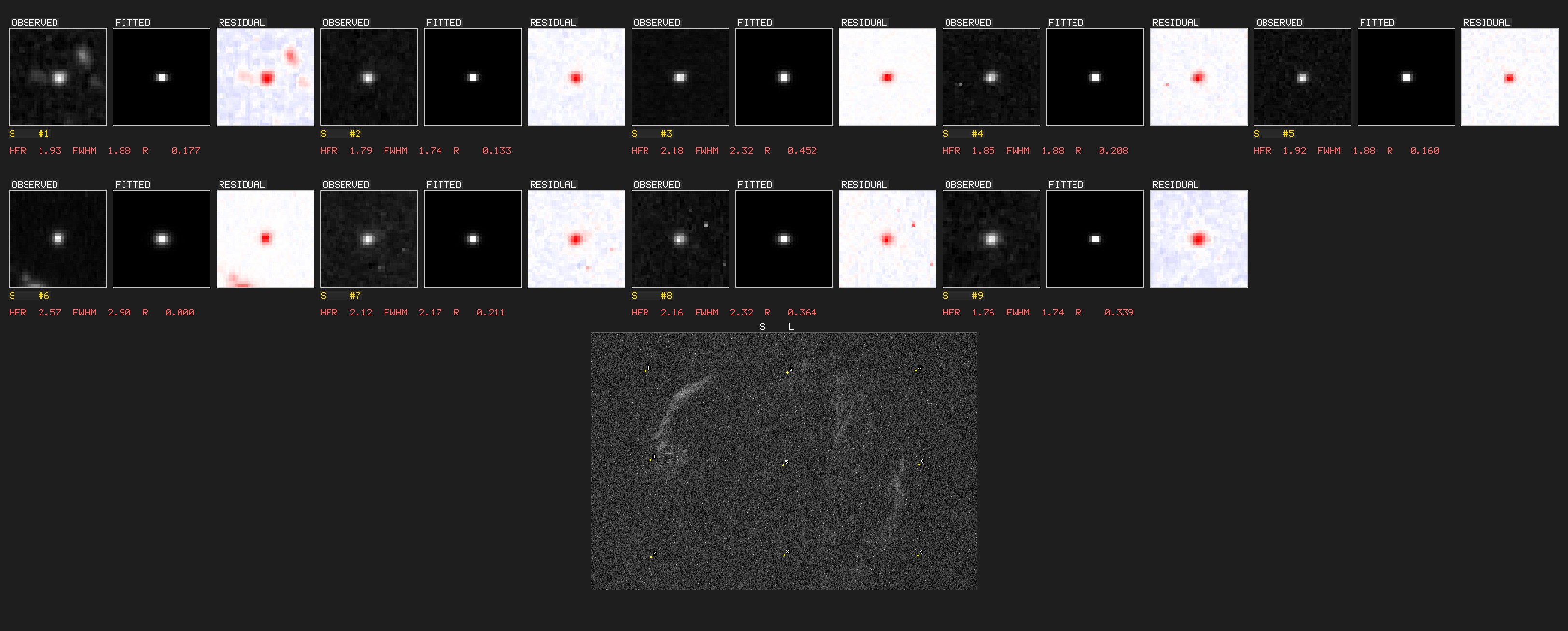
visualize-psf-multi command outputs observed,
fitted, and residual grids using Moffat and Gaussian models.These analysis commands also support XISF file paths. The annotated star maps
label detected stars with their measured HFR. You can use the --max-stars
flag to control label density and field coverage.
Use FITS utilities
psf-guard stretch-to-png image.fits -o output.png    # MTF auto-stretch
psf-guard read-fits image.fits                       # header/metadata dump
Query databases and grade images manually
psf-guard list-projects -d database.sqlite
psf-guard list-targets "Project Name" -d database.sqlite
psf-guard dump-grading -d database.sqlite [--project NAME]
psf-guard show-images <IDS> -d database.sqlite
psf-guard update-grade <ID> rejected -d database.sqlite
psf-guard regrade database.sqlite [--dry-run]        # statistical re-grading
Batch commands also support statistical outlier detection using the
--enable-statistical flag. This enables HFR and star-count
distribution analysis per target and filter, as well as sequence-based cloud
detection. Detailed information is available in the
docs/STATISTICAL_GRADING.md
document.