Astrometry Quality
A quality scan solves the current FITS pixels using Seiza, compares each solved center with the intended catalog target and its sequence, and adds auditable pointing evidence to the same 0 to 1 quality score used for cloud, occlusion, photometry, guiding, and PSF grading.
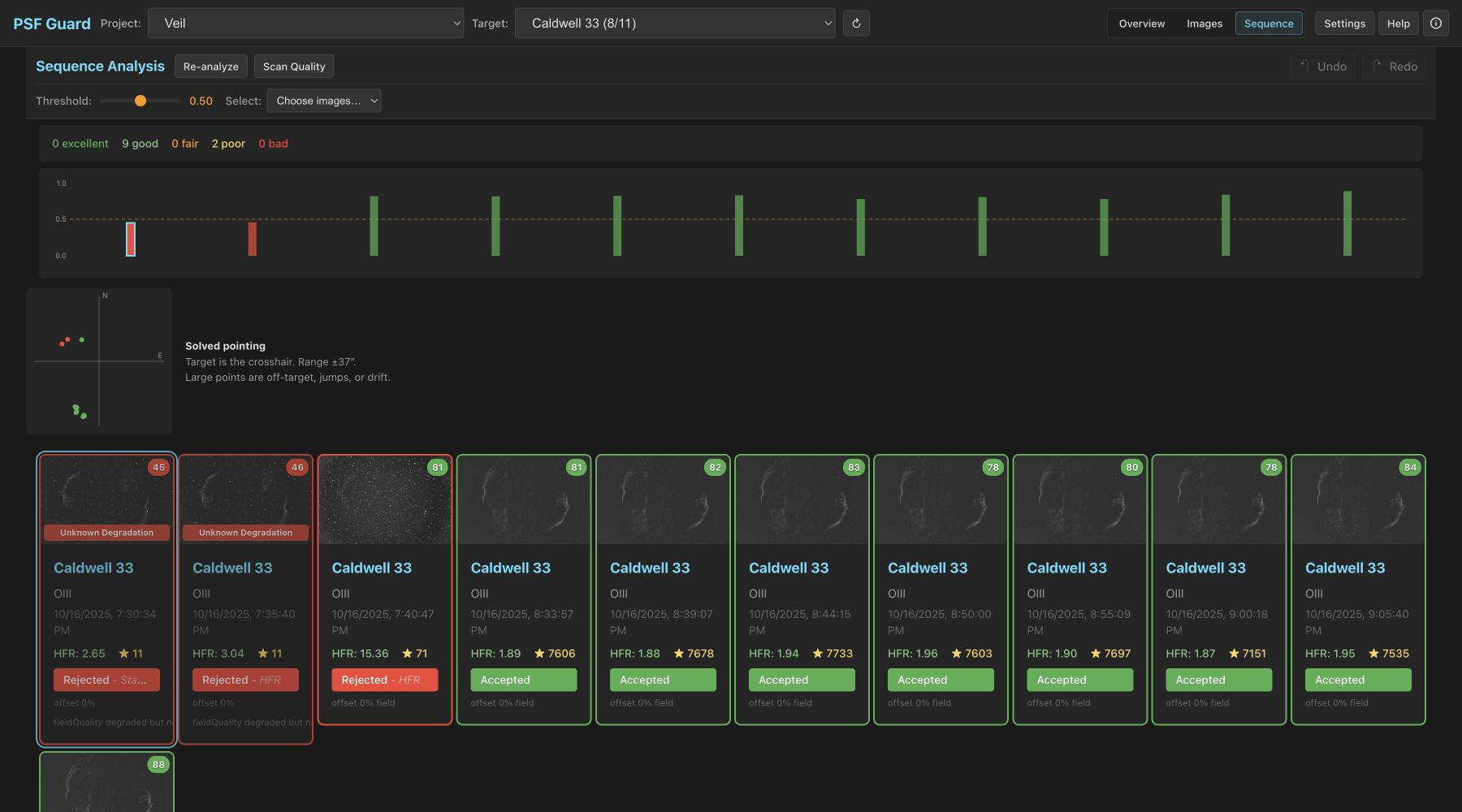
You can run a quality scan from the UI
- Open a catalog target and select the Sequence Analysis tab.
- Click the Scan Quality button. The system performs spatial and photometric analysis before initiating a plate solve for each frame.
- Inspect the pointing scatter plot and the individual frame evidence. You can use the selection buttons, such as Select Off Target, Select Unsolved, or Select Recommended, to filter the frames for review.
Results are cached per database, but reuse is tied to the FITS size and modification time plus the solver resource fingerprints. Replacing a FITS file under the same name cannot reuse stale WCS.
Quality flags affect frame grading and scores
| Flag | Evidence | Score / recommendation |
|---|---|---|
| Off Target | The target coordinates lie outside the solved footprint, or a short departure is at least 20% of the shorter field dimension. | The pointing score is set to 0, the total score is capped at 0.20, and rejection is recommended. |
| Stable Offset | At least three consecutive solved frames form a stable framing cluster while the target remains within the field of view. | This flag is advisory only, applying no score cap or automatic rejection. |
| Pointing Jump | A small group of frames deviates from a framing cluster and subsequently returns to it. | The total score is capped at 0.30, and rejection is recommended. |
| Pointing Drift | A progressive trend within a contiguous framing segment exceeds the field or scatter threshold. | The affected frames in the tail of the segment are capped at 0.30, and rejection is recommended. |
| Plate Solve Failed | The image pixels decoded successfully, but the field failed to solve or too few stars were detected. | The system applies a modest penalty and only recommends rejection if independent image degradation is also detected. |
| Solve Unavailable | An error occurred during catalog access, pixel decoding, solve cancellation, or system resource allocation. | This is treated as an operational error, and no quality flag is applied or automatic grade recommended. |
The system clusters the solved centers before determining pointing offsets, jumps, or drift. A sustained reframing step (such as an A → B transition or an A → B → C mosaic) is treated as a new stable segment. This prevents subsequent frames from being incorrectly flagged as off-target or triggering false drift detections. A short excursion (such as A → B → A) is classified as a pointing jump. Drift is calculated independently within each contiguous segment.
PSF Guard locates the intended target
PSF Guard reads catalog files directly without modifying their schema. The system prefers target RA/Dec fields, using compatible target metadata and capture-specific coordinates as fallbacks. Absolute Off Target grading is only performed when authoritative coordinates with a supported epoch are available.
If no target coordinate is available, the system still uses the solved centers to detect relative pointing jumps and drift. PSF Guard does not assign an Off Target verdict in this scenario.
You can review proposed changes before they are written to the database
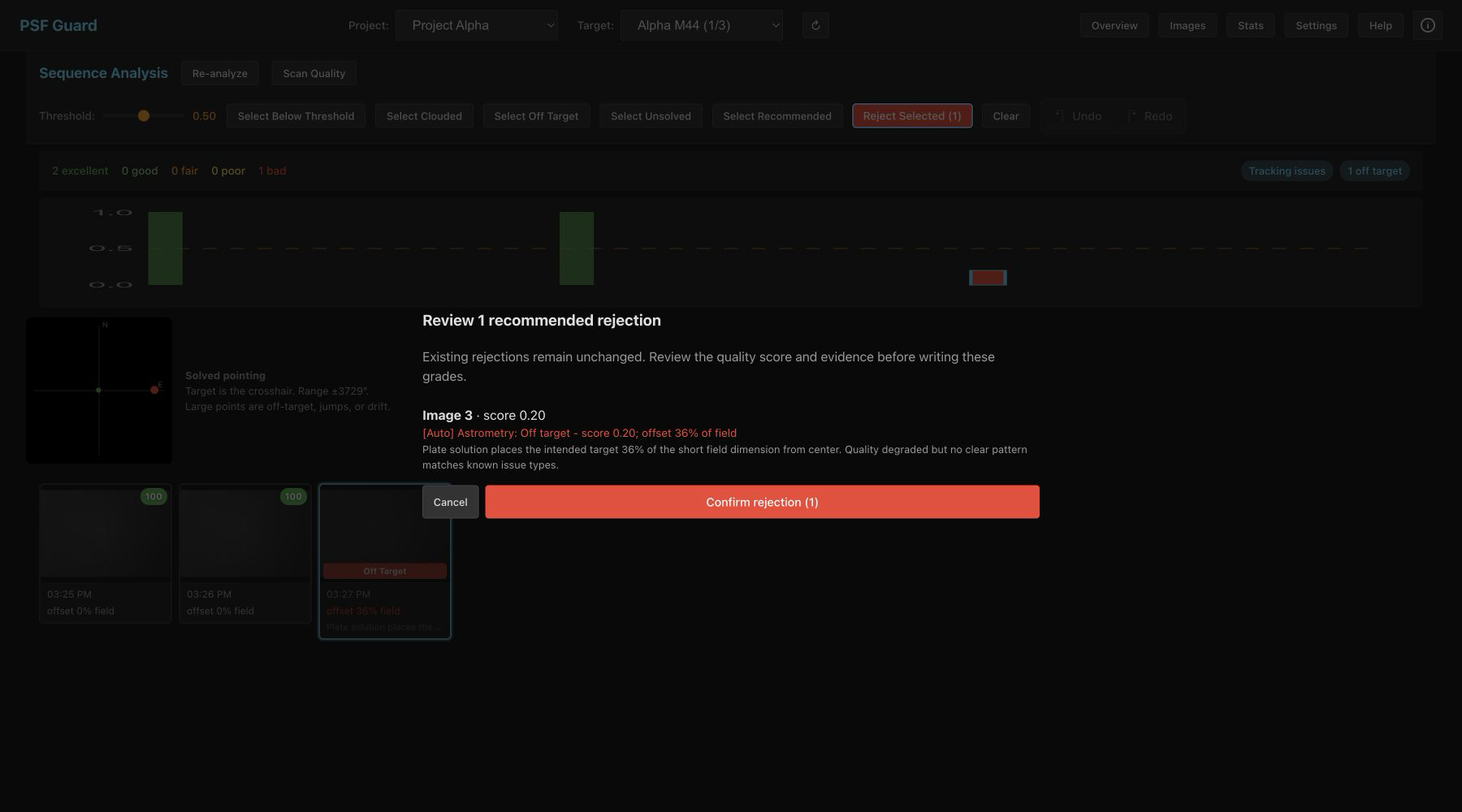
[Auto] reason, and the supporting evidence.No database modifications are made until you click Confirm rejection. Existing rejected images are not altered, and UI changes can be reverted using the standard undo and redo stack. The generated reason strings are specific to allow for future auditing:
[Auto] Astrometry: Off target - score 0.20; offset 36% of field
[Auto] Astrometry: Tracking lost - score 0.30; pointing jump 420 arcsec
The CLI supports regrade workflows
Use the --dry-run option to preview changes before modifying the database.
# Preview every proposed database write
psf-guard screen-fits /path/to/lights --regrade-db my-db --dry-run

# Apply supported recommendations
psf-guard screen-fits /path/to/lights --regrade-db my-db
The --regrade-db option matches each frame by its base filename and capture timestamp within a ten-minute window, loads the intended target, and performs a fresh plate solve. Our isolated solve failure is reported and reduces the frame score, but does not trigger an automatic rejection. Operational solver errors do not penalize the frame.
If orbital elements are configured or cached, the plate solve also projects satellite crossings and checks nearby pixels for matching trails. Predicted crossings reduce the score for manual review, whereas only high-risk trails with verified pixel alignment will trigger a rejection proposal. See Satellite Tracks.
The technical implementation details are available in the repository at docs/ASTROMETRY_QUALITY.md.